

Release Notes
ADK 2.0
ADK 2.0 is here. This is a major release from 1.18.3, focused on making ADK better for teams building real agents: an ADK-aware assistant in the Dev Console, multi-agent development, Cloud Mode for deployed agents, faster evals, richer observability, simpler integration management, reusable components, and a faster local development loop.
The release is broad, but the direction is simple: less jumping between tools, clearer boundaries between local and production work, and more visibility into what your agents are doing.
Build with Agent(0)
Agent(0) is a new ADK-aware assistant built into the Dev Console.
It is not a generic chat sidebar. Agent(0) understands the project you are working in and can help with the actual ADK development loop: edit Actions and Workflows, run CLI commands, debug build and runtime errors, send test messages, inspect traces, read logs, and help pull in integrations when the project needs them.
The goal is simple: keep the assistant close to the code, the console, and the runtime context where the work is happening.
Develop Multiple Agents
The Dev Console has been reworked around the way teams actually build agents: often more than one project, more than one running bot, and more than one thing to compare.
New Project Home
ADK now opens to a project home screen where you can create new bots from templates, return to recent projects, and see running bots with live status.
Open the Console From Anywhere
You can open the console with adk outside a project directory, then create, open, continue, or stop projects from the UI.
Multi-Agent Switching
When you run adk dev in another project, it registers with the same Dev Console. The bot picker lets you move between agents without opening a new browser session for each one.
Dev Server Management
The CLI adds adk ps and adk kill for checking and stopping running dev servers.
Sidebar View
The console also adds a much-requested sidebar view, giving teams a more focused layout for moving between the agent, console views, runtime output, and project tools without losing context.
This makes the Dev Console feel less like a single-project preview and more like a local workspace for agent development.
Inspect and Deploy Production Agents With Cloud Mode
ADK 2.0 introduces Cloud Mode, a way to connect the Dev Console to deployed Botpress Cloud bots.
Inspect Production From the Dev Console
With Cloud Mode, you can inspect production conversations, traces, tables, files, and knowledge from the same interface you use locally. Production mode is marked clearly, and dev-only actions are hidden so it is easier to tell when you are looking at live data.
Deploy From the Dev Console
Deployment also moves into the console. From the agent menu, you can deploy and watch each step run: applying config and secrets, deploying the bot, publishing metadata, and syncing knowledge bases, tables, and assets.
The CLI path is still there with adk deploy, but the console now gives teams a more visible way to move from local work to production.
Run Faster, More Useful Evals
Evals are much faster in ADK 2.0, especially for suites with workflow assertions.
Faster Assertion Handling
The runner no longer waits out the full idle timeout for assertions that are supposed to prove something did not happen, such as a workflow that should not be entered or completed. Instead, it uses the spans already collected during the turn and lets the grader decide the result. That removes a lot of dead time from common eval suites.
Assertion Failures Behave Like Test Results
Assertion failures are now treated more like test results and less like runtime crashes. A missing response, state assertion error, or workflow assertion failure can be reported as a failed assertion while the run keeps producing useful output for the rest of the suite.
Live Eval Runs
Runs now stream results as they happen, so you can see each assertion pass or fail without waiting for the whole suite to finish. The new eval page makes current and previous runs easier to follow, and the eval runner has moved into its own package so it can evolve independently from the runtime.
Under the hood, the release includes improvements to trace collection, run persistence, timeout diagnostics, and event handling, so evals should be faster, easier to trust, and easier to debug when something goes wrong.
Understand Agent Behavior With Analytics, Logs, and Agent Map
ADK 2.0 adds more ways to see what agents are doing over time and during individual runs.
Agent Analytics
The Dev Console now has a dedicated analytics page for understanding how agents behave over time.
The built-in views cover conversation, message, and user volume; workflow volume and duration; LLM activity; token usage; latency; throughput; and cost. That gives teams a quick read on usage and performance without leaving the ADK workflow.
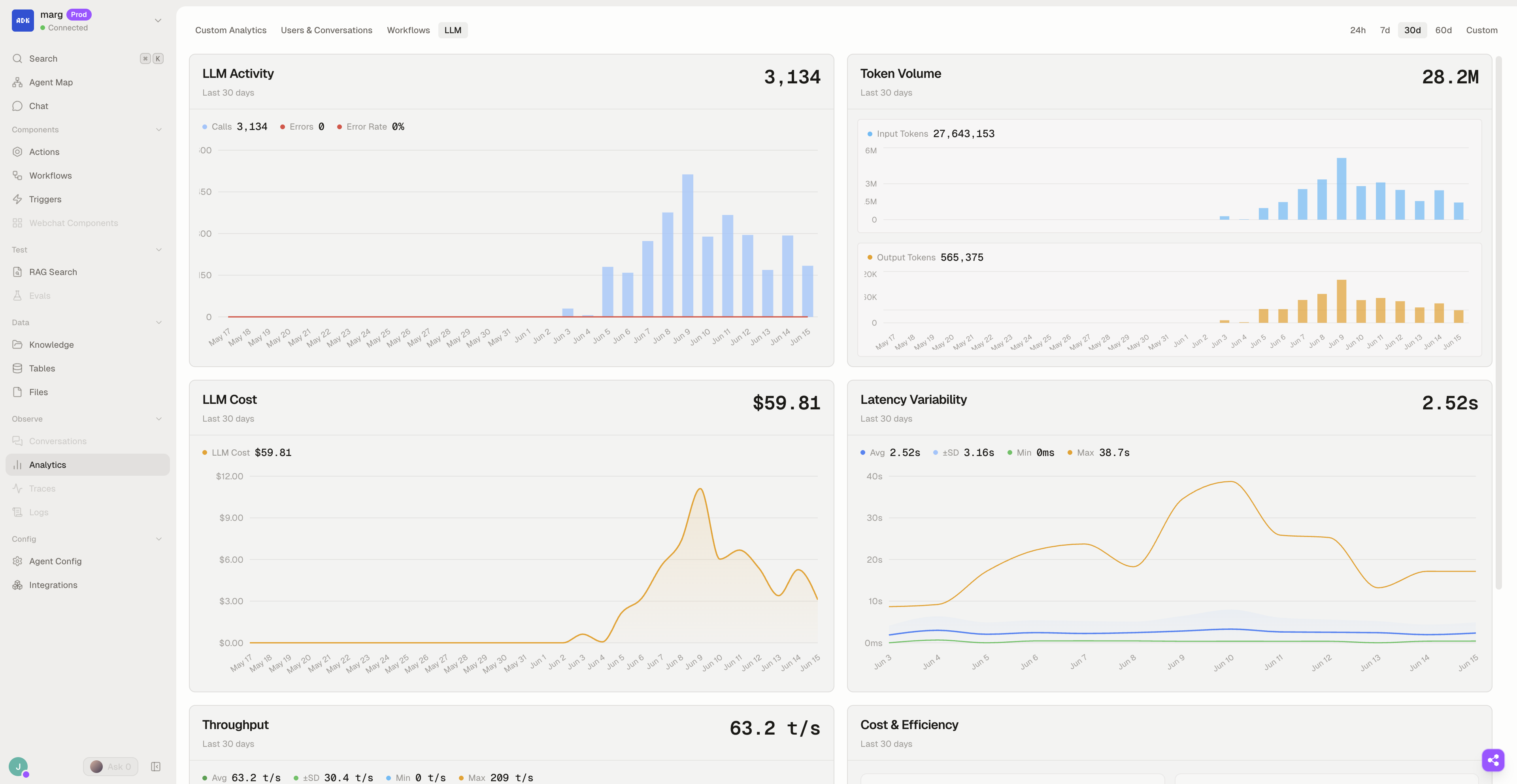
Custom Analytics
Custom Analytics lets teams build their own charts from the metrics that matter to a particular agent. If one bot is judged by workflow duration and another by escalation rate or custom events, the console can reflect that instead of forcing every project into the same dashboard.
Runtime Logs
Runtime logs are easier to work with. adk logs lets you query and tail logs from the terminal, with filtering and OTLP export for teams that want ADK runtime data in their own observability stack.
Agent Map (Experimental)
Agent Map is a new experimental graph view for understanding an ADK project. It shows Actions, Workflows, Triggers, Conversations, and how they reference each other.
The map is built from source structure, not a single runtime trace, so it is useful for seeing how an agent is designed before you start following one particular execution path.
In local development, Agent Map can stream from the project. For deployed bots, ADK publishes metadata during deploy so the console can show production Agent Map snapshots when that metadata is available.
It is experimental, but it points toward an important direction: making agent structure easier to inspect visually as projects grow.
Manage Integrations and Reusable Components
ADK 2.0 makes it easier to manage the external pieces an agent depends on: integrations, plugins, and reusable UI components.
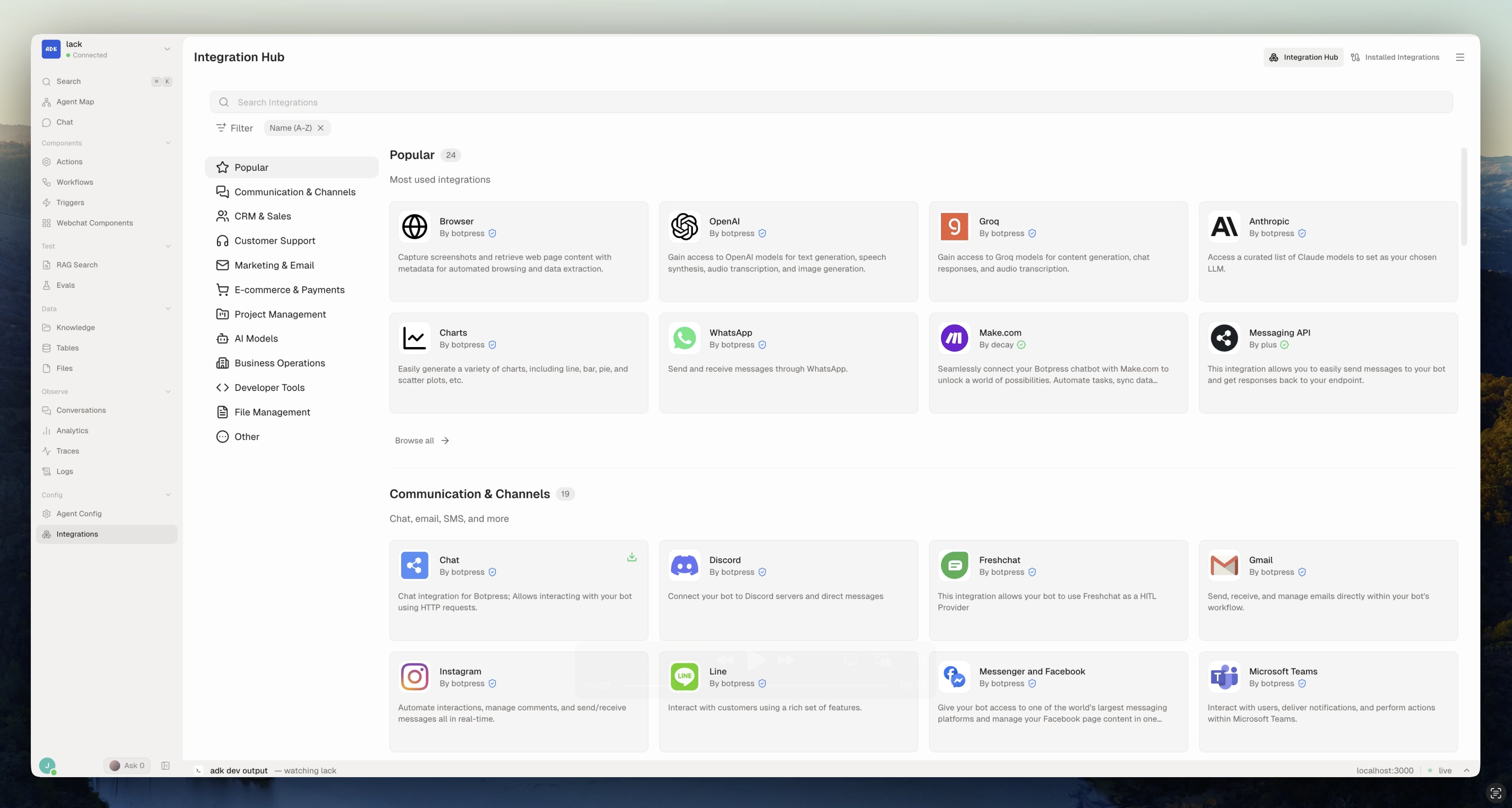
Simpler Integration and Plugin Management
Integration and plugin management has been redesigned around Botpress Cloud.
Instead of treating integrations as local project files that have to be manually kept in sync, ADK now reflects the Cloud state of installed integrations and plugins. You can install, configure, enable, disable, copy, diff, and promote them between development and production from the Dev Console or CLI.
This also gives ADK clearer status language. An integration can be available, disabled, unconfigured, unresolved, or missing, and deploys can block only when a dependency would actually ship broken. If an integration needs configuration, it can install disabled or show an explicit unconfigured state instead of failing later in a less obvious way.
For Agent(0) and for human teams, that matters: the project has a clearer picture of what is installed, what is ready, and what still needs attention.
Component Registry
ADK 2.0 adds a Component Registry for reusable Custom Components.
The registry gives teams a place to browse components, preview them, and add them to a bot. When a component is added, ADK brings the source into the project, generates the CustomComponent wrapper with metadata, and can wire it into the conversation that should use it.
This is especially useful for teams building richer chat experiences. Cards, forms, badges, branded surfaces, and other reusable UI pieces can become part of the agent project instead of living as one-off examples or copy-pasted snippets.
Move Projects and Keep Team Boundaries Clear
ADK 2.0 adds more structure for teams moving projects across machines, accounts, and environments.
Project Export and Import
adk export packages an ADK project into a portable .adk archive, including source, config, assets, evals, docs, and live integration and plugin setup. adk import restores that archive into a fresh directory, links or creates the destination bots, and installs dependencies.
Local identity and secrets stay out of exported archives by default, and import does not deploy automatically. That makes archives useful for sharing and moving projects without accidentally shipping them.
The archive carries your integration and plugin configuration as part of the dependency snapshot; adk export --no-config leaves those credentials out for wider sharing.
Profiles and Environment Safety
ADK 2.0 also adds named profiles, so people working across multiple Botpress accounts or environments can choose credentials per command with --profile or set a default with adk profiles set.
Project links define the shared Botpress workspace and production bot. CLI profiles define the person or environment credentials used to make a request. Dev and production targets decide which bot a command acts on. Keeping those boundaries separate makes it easier for teams to collaborate on the same ADK project without confusing local state, personal auth, and production resources.
Agent(0) Project Boundaries
Agent(0) also gets clearer project boundaries. Its project capabilities live with the project, while harness behavior stays inside ADK. That gives teams a place to improve how Agent(0) should help inside a specific repo without mixing those instructions into the framework itself.
The theme here is not more process. It is safer iteration: clearer environment targeting, clearer assistant context, and fewer accidental leaks between local development and production work.
Faster, Lighter, and More Reliable Day to Day
ADK 2.0 is faster and lighter during local development.
Faster Startup and Lower Memory Use
The dev worker pool now scales instead of starting every worker immediately, which cuts baseline memory use for adk dev. CLI startup is faster, reloads are quicker, source-map optimization has been rewritten for large maps, and build caches are faster to write and smaller on disk.
- Idle dev workers: 10 → 2
- Source-only reloads: ~1.8s → ~0.9s (about 49% faster)
- Optimized source maps: 30+ MB → under 1 MB
More Focused TUI
The Dev Console and terminal have also moved onto a lighter streaming core. The TUI is more focused and more performant, with cleaner updates for runtime logs, Agent(0) events, and build or deploy progress.
Reliability and Fit-and-Finish
Workflow state tracking is more reliable. Conversations can control which incoming events interrupt in-progress processing. User profile fields can be updated at runtime. The Dev Console terminal stays open after fatal errors so you can read what happened. Agent status indicators better reflect running, building, errored, and stopped states.
Errors are clearer across evals, plugin lookup, model stream stalls, dev server startup, chat, relinking, and knowledge search. The file watcher also handles atomic saves from editors that write and rename files.
None of these is the flashiest part of 2.0, but together they make the release feel less brittle and more ready for teams building agents every day.